
-
Lesson 1: Web Foundations (HTML, CSS, JavaScript)4 Topics
-
Lesson 2: Responsive Design and Accessibility4 Topics
-
Lesson 3: Modern Front-end Development (Frameworks and State)3 Topics
-
Lesson 4: Back-end Fundamentals, Data, and Security4 Topics
-
Lesson 5: Quality, Performance, SEO, and Deployment (DevOps Basics)5 Topics
Participants 8


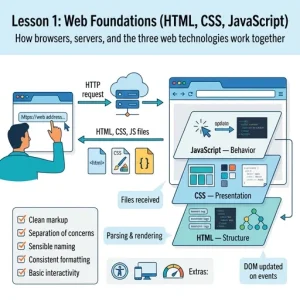
Everything you build on the web sits on a few core foundations. In this lesson, you will learn how websites are delivered to a browser, and how to create pages that are well-structured, well-styled, and interactive. These skills form the base for all the more advanced work later in the course, including responsive design, accessibility, performance, and deployment.
You will start by looking at what happens when you type a web address into a browser: how the browser and server communicate, what files are sent back, and how the browser turns those files into a visible page. With that understanding, you will then build pages using the three key technologies of the web:
- HTML to create correct structure and meaningful content (not just “what it looks like”, but what it is).
- CSS to control presentation, layout, spacing, and visual hierarchy using modern, practical techniques.
- JavaScript to add behaviour, respond to user actions, and update the page through the DOM.
By the end of this lesson, you should be able to build a simple webpage from scratch with clean markup, a clear layout, and basic interactivity such as handling clicks, form input, or showing/hiding content. You will also practise habits that make your code easier to maintain, including sensible naming, consistent formatting, and separating structure (HTML), style (CSS), and behaviour (JavaScript).